> For the complete documentation index, see [llms.txt](https://docs.reveald.com/technical-documentation/llms.txt). Markdown versions of documentation pages are available by appending `.md` to page URLs; this page is available as [Markdown](https://docs.reveald.com/technical-documentation/data-sources-early-access/vmware-vsphere/create-the-vsphere-user-account.md).
# Create the vSphere User Account
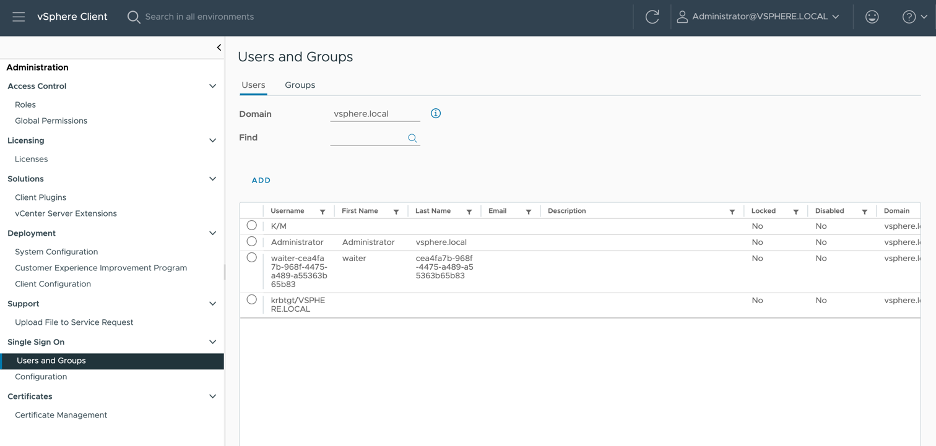
In the vSphere web client, navigate to Administration → Single Sign On → Users and Groups:
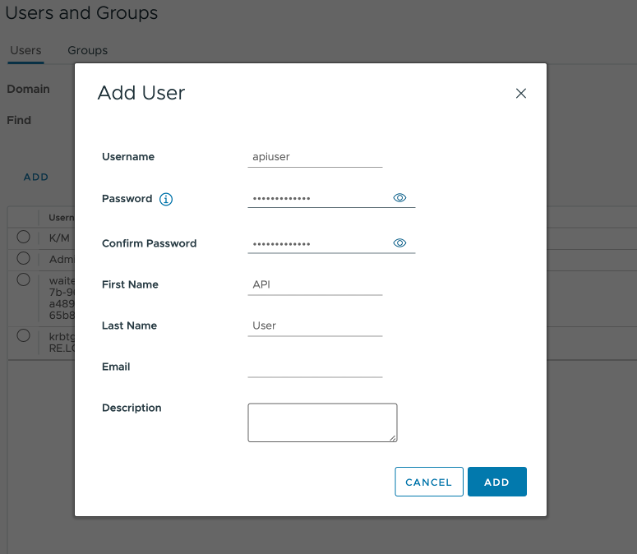
Verify you are on the ‘vsphere.local’ domain in the “Domain” field and click “Add,” then enter the preferred username and password, then click “Add” on the bottom right.